Cookie Cockpit

Cookie Cockpit

The All-In-One Cookie Manager

  • Elegant
  • Powerful
  • Secure
  • Open-Source
  • Free
Add to Browser

Simple Cookie Control For All

Cookie Cockpit is a free Chrome extension that gives you complete visibility and control over the cookies on any website. Made for web developers, mar-tech professionals, tagging specialists, implementation engineers as well as privacy-conscious users.

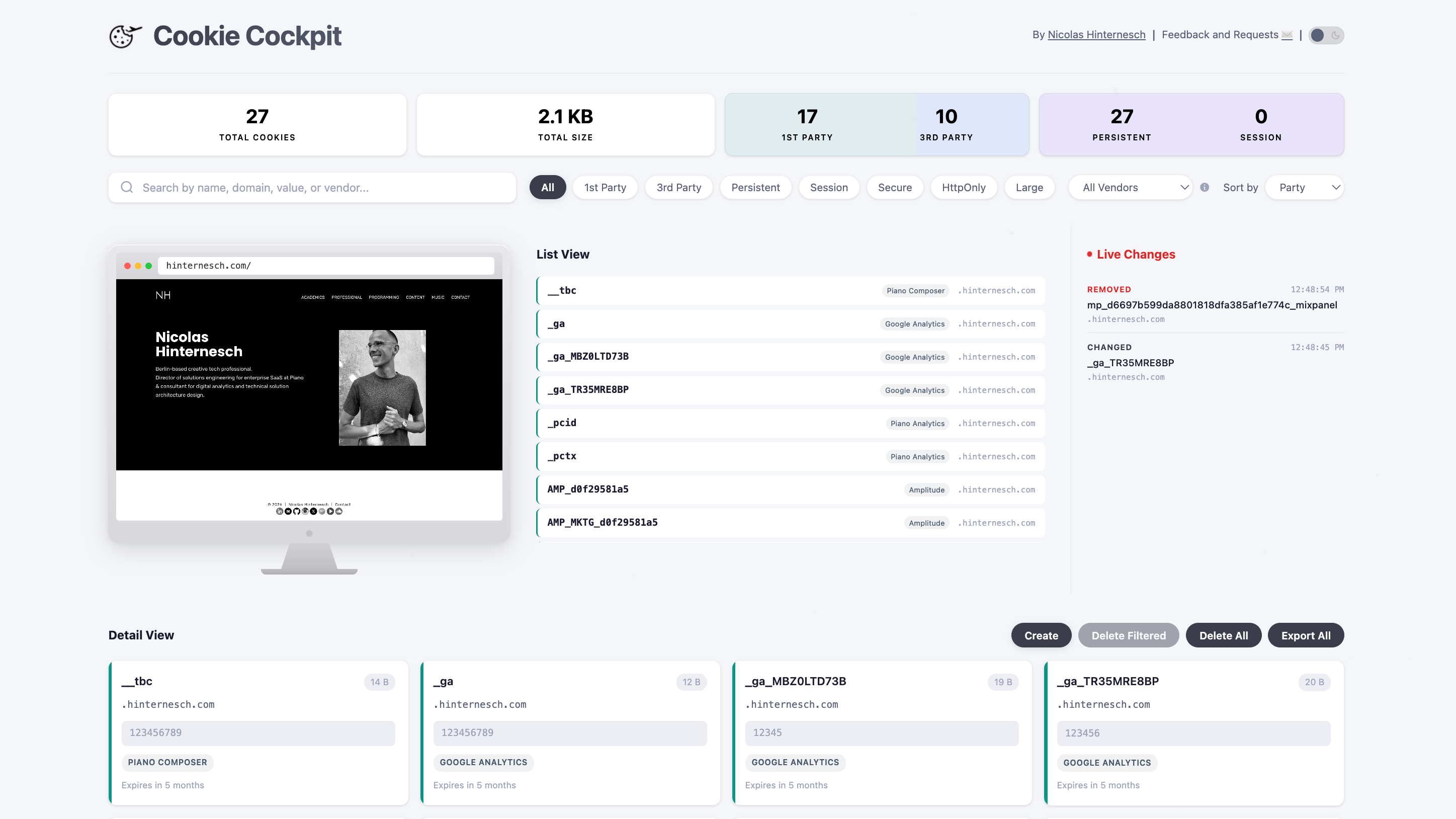
Cookie Cockpit combines all core functionality of a state-of-the-art cookie manager with advanced features like vendor identification, real-time monitoring, and local storage mapping — made accessible for everyone in a simple and intuitive single-page dashboard.

Cookie Cockpit dashboard showing live cookie monitoring, vendor identification, and detail view

Key Features

📊

Intuitive Dashboard

View all cookies for the current site in a clean list view and advanced detail view. Filter, sort, and search cookies by domain, name, value, or vendor. Elegant modern design with full dark mode support.

Real-Time Monitoring, Local Storage Mapping

Listen to cookie changes in real-time and monitor new, modified, and deleted cookies. Map cookie values against local storage to identify sites persisting IDs beyond cookies across browser storage methods.

🏷️

Vendor Identification

Recognize and filter cookies from known vendors, ad networks, analytics providers, and other third-parties - helping you understand who is setting cookies and why.

✏️

Creation, Editing, Deletion, Export

Edit any cookie value, expiration, domain, path, or flags directly from the dashboard. Changes take effect immediately. Create new cookies with custom attributes. Delete individual cookies or clear all cookies with one click. Export cookie details via CSV.

🔒

Security

Local processing only. No data is collected, stored, or sent to any external server. No analytics, no tracking, and no third-party services.

📖

Free & Open-Source

Always free to use, MIT License, source code is fully available on GitHub.

Frequently Asked Questions

Why is it important to understand cookie behavior on the sites I visit?
Cookies shape your online experience in ways you might not realize. They are simple text files stored on your device. They persist information, e.g. device IDs, across sessions. This can be used to control login sessions, ensure site functionalities, store personal preferences, and maintain device identification for returning visitors. Understanding which cookies are active — and who set them — helps you protect your privacy, debug website issues, verify compliance with regulations like GDPR, and make informed decisions about the services you use.
Does Cookie Cockpit collect my data?
No. Cookie Cockpit processes everything locally in your browser. No data is collected, stored, or sent to any external server. There are no analytics, no tracking, and no third-party services. Your browsing data stays entirely on your machine.
What browsers does Cookie Cockpit support?
Cookie Cockpit is built for Google Chrome using Manifest V3 and requires Chrome 116 or later. It works on any Chromium-based browser that supports Chrome extensions, including Microsoft Edge, Brave, Arc, and Opera.
How does vendor identification work?
Cookie Cockpit maintains an internal database of known cookie patterns from advertising networks, analytics providers, consent management platforms, and other third-party services. When it detects a cookie, it matches the cookie name and domain against this database to identify the vendor and purpose behind it.
What is the best free cookie manager extension for Chrome?
Cookie Cockpit is a free, open-source cookie manager for Chrome and Chromium-browsers that combines a live dashboard, real-time monitoring, vendor identification, local storage inspection, and full cookie editing in a single extension. It is privacy-first with zero data collection and is MIT-licensed. While there is no definite universal answer to what the best extension is, Cookie Cockpit is a state-of-the-art and modern all-in-one cookie solutions that is likely to match your exact needs.
What Chrome extension can identify third-party tracking cookies?
Cookie Cockpit automatically identifies cookies from known ad networks, analytics providers, and consent management platforms using a built-in vendor database. It color-codes third-party cookies in blue and shows the vendor name and purpose for each recognized cookie.
How do I see, edit, and delete cookies for a website in Chrome?
Cookie Cockpit shows you every cookie set by the website you are currently visiting as soon as you open the extension. Click on any cookie to open the detail view, then modify its value, expiration date, domain, path, or security flags. Changes take effect immediately — no browser restart needed. You can also create new cookies with custom attributes, delete any individual cookie with one click, or use the bulk delete option to clear all cookies for that site at once. The live view updates in real time, so you can immediately confirm your changes.
Can I detect when cookies are also stored in Local Storage?
Yes. Cookie Cockpit is the only cookie manager extension that automatically cross-references every cookie value with the site's Local Storage entries. If a match is found, it's flagged with an orange "Found in Local Storage" badge on the cookie card and highlighted in a dedicated counter on the dashboard.
Why can it be useful to review data in Local Storage in addition to cookies?
Cookie Cockpit maps IDs found in cookies with IDs found in Local Storage, in order to help you identify if sites duplicate specific IDs across browser device storage methods. This allows you to single out redundant or persistent tracking identifiers that survive cookie deletion by being duplicated to Local Storage. While this technique is not inherently harmful and can be useful for site functionality, there are numerous cases in which redundant tracking IDs by tracking- or ad-vendors are using this method to persist their user identification despite a user clearing their cookies. Cookie Cockpit gives you an additional layer of control and allows to delete redundant Local Storage entries right from the dashboard.

Open Source

Cookie Cockpit is MIT-licensed and open source. Inspect the code, contribute, or fork it.

View on GitHub

Always Free

Cookie Cockpit is available for Chrome, Edge, Brave, Opera, Vivaldi, Arc, and more. Install the extension with a single click from the Google Chrome Web Store.

Add to Browser